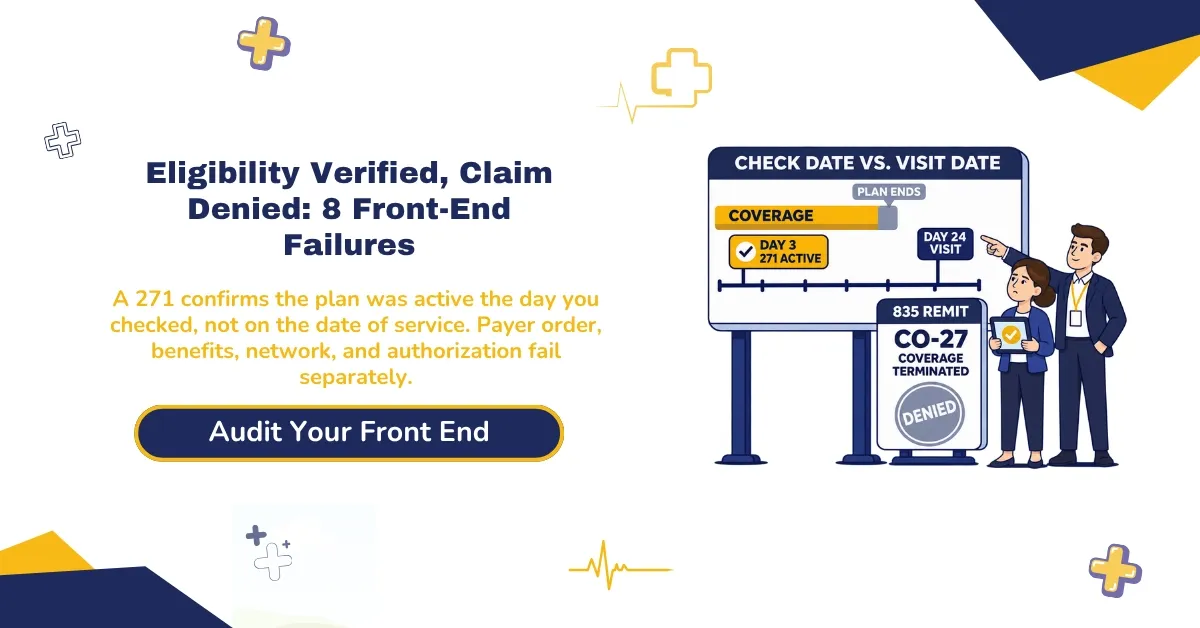
Quick answer: Eligibility verified, claim denied means the check answered a narrower question than the claim did. A 271 response confirms the plan was active the day you ran it. It doesn’t confirm coverage on the date of service, payer order, service benefits, network status, or authorization. Each gap is a front-end revenue cycle failure with its own denial code.
Your front desk ran eligibility on the 3rd and got a green “active.” The patient came in on the 24th. Three weeks later, the remit came back CO-27, coverage terminated. Your staff didn’t skip a step. They checked on the 3rd, and the payer judged the claim on the 24th.
Optum’s 2024 Revenue Cycle Denials Index found that 44% of denials in 2023 started on the front end, and registration and eligibility errors caused 24% on their own. Optum built those figures from about 124 million hospital claim remits, so treat them as a hospital benchmark. Physician practices see the same failures under the same denial codes.
This guide maps the eight failures that turn a passed eligibility check into eligibility denials. Each one gets its CARC code, the point where your team can still catch it, and the fix once the denial lands. All eight happen in the front-end steps of the 13 RCM steps. We call the framework the Verified-Denial Map.
What “Eligibility Verified” Confirms on a 271 Response (and What It Misses)
An eligibility check confirms that the payer showed the plan as active on the day of the inquiry. Unless your team asks for more, that’s about all it confirms.
What a 271 Response Confirms
The 270 is your inquiry, and the 271 is the payer’s answer. Both are HIPAA-standard ASC X12 transactions, and most real-time eligibility verification tools run them behind the scenes. Send the inquiry with service type code 30, health benefit plan coverage, and the payer’s answer centers on whether the plan is active.
Office visits, imaging, and therapy each have their own service type codes. If your team never asks about them, the 271 won’t show their limits, copays, or exclusions.
Every benefit line in a 271 starts with a code. A 1 means active coverage, 6 means inactive, and 5 means active but pending investigation. Other codes flag exclusions (E), limitations (F), non-covered services (I), and another payer (R). Most front desks read the first code and stop there.
That habit costs money, because X12’s interpretation of the 271 says the response isn’t meant to imply a guarantee of payment or coverage. X12 maintains the standard, so a green “active” can’t protect a claim on its own.
What a 271 Response Can Miss
A 271 can leave out most of what decides whether a claim pays, and what it returns varies by payer. Most front-end revenue cycle failures start in the rows below.
| What you need to know | Shown on the 271? | Why it fails | Failure |
|---|---|---|---|
| Plan active on the inquiry date | Yes | Shows that day, not the date of service | 1 |
| Plan begin and end dates | Often, if the payer returns them | Nobody saves or reads them | 1 |
| Name, DOB, and member ID as the payer holds them | In most cases | Not copied back into registration | 2 |
| Other coverage and payment order | Only what the payer has on file | Payer’s COB record can be stale | 3 |
| Plan or product type (MA, MCO, carve-out) | Varies by payer | Read as a plain “active” | 4 |
| Service-level benefits and limits | Only for the service type you asked about | Checked with code 30 only | 5 |
| Network status for this provider and site | Sometimes | Rarely checked by rendering provider | 6 |
| Prior authorization for this CPT | Rarely specific | Needs the payer’s auth list or portal | 7 |
| Referral or PCP assignment | Sometimes, on managed plans | Outside the standard check | 8 |
Your eligibility verification errors trace back to rows in this table. The answer existed, but your team didn’t ask for it or didn’t read it. That’s the eligibility vs. benefits verification split: eligibility asks whether the plan is active, and benefits asks whether this service is covered, what the patient owes, and what limits apply.
It’s also how you end up with a claim denied after eligibility verification passed. Closing that gap is the core of our insurance eligibility verification services, which read every benefit line in the 271 before the visit.
Claim Rejection vs. Denial: Where Front-End Failures Show Up
A rejection stops a claim before the payer adjudicates it. A denial comes after the payer processes the claim and decides not to pay.
A front-end rejection happens when clearinghouse or payer edits stop the claim at intake. The 999 acknowledgment only tells you the file’s format passed. Your 277CA report tells you whether the payer accepted the claim, using claim status categories such as A3 (returned as unprocessable) and A7 (rejected for invalid information). See our guide to clearinghouse rejection codes.
A denial shows up on the 835 ERA with a group code (CO, PR, or OA), a Claim Adjustment Reason Code (CARC), and in most cases a Remittance Advice Remark Code (RARC). A claim that slips past front-end edits with missing data often comes back with a CO-16 denial code, and the RARC names what’s missing.
From there, the claim needs a correction, a reconsideration, or an appeal. That’s the work denial management services exist to handle, and it costs far more staff time than the original check would have.
Front-end denials and rejections grow out of the same front-end revenue cycle steps. The claim rejection vs. denial split decides who fixes the claim and which deadline applies.
| Rejection | Denial | |
|---|---|---|
| When it happens | Before adjudication | After adjudication |
| Where you see it | 999, 277CA, or clearinghouse report | 835 ERA or EOB |
| Typical front-end cause | Invalid member ID, name or DOB mismatch, wrong payer ID | Coverage ended, wrong payer order, service not covered, no auth |
| Codes | Claim status categories such as A3, A6, A7, and A8 | Group code plus CARC plus RARC |
| Fix | Correct and resubmit | Corrected claim, reconsideration, or appeal |
| Timely filing | In most cases the payer never accepted it, so the clock keeps running | The payer’s corrected claim and appeal deadlines apply |
Soft, Hard, and Preventable Denials
Most billing teams sort denials three ways: soft, hard, and preventable.
- Soft denials: a correction or more information can get them paid
- Hard denials: they won’t pay without a successful appeal, and some end as write-offs
- Preventable denials: your team could have caught them before the claim existed
All eight failures in this guide are preventable. Several turn into hard denials once the date of service passes, because the fix depended on something your team could only get before the visit, like an authorization or a referral.
The 8 Front-End Revenue Cycle Failures Behind Verified Claims That Deny
The eight failures that deny verified claims are coverage changes, identity mismatches, wrong primary payer, wrong plan or product, non-covered services, out-of-network care, missing or mismatched authorization, and missing referrals. They’re the eight that most often survive a passed eligibility check.
The Verified-Denial Map sorts these failures into two groups and gives each one a code, an owner, and the last point to catch it. Treat it as the front edge of end-to-end revenue cycle management, where your team can still fix the problem while the patient is in the building.
Code descriptions follow the X12 CARC code list.
| # | Failure | What the check missed | CARC | Owner | Catch it at |
|---|---|---|---|---|---|
| 1 | Coverage changed after the check | End or start date vs. date of service | 27, 26 | Front desk | Day before and check-in |
| 2 | Patient doesn’t match member file | Payer’s name, DOB, and member ID | 31, 140, 16 | Registration | Intake, every visit |
| 3 | Wrong payer billed first | Other coverage and payment order | 22 | Registration | Every visit |
| 4 | Right card, wrong plan or product | MA plan, Medicaid MCO, or carve-out | 109, 24 | Registration | Scheduling |
| 5 | Active plan, non-covered service | Service-level benefits and limits | 96, 204, 119 | Benefits verifier | Scheduling |
| 6 | Out-of-network provider or site | Network status of rendering provider | 242 | Credentialing and front desk | Scheduling |
| 7 | Prior auth missing or mismatched | CPT, units, dates, and site match | 197 | Authorization team | Before the booking is confirmed |
| 8 | Referral or PCP missing | Referral on file, PCP assignment | 288, 242 | Front desk | Scheduling |
Image alt text: The Verified-Denial Map showing 8 front-end failures and their CARC codes
Failures 1 to 4 decide whether the right payer gets the claim. Rows 5 to 8 decide whether that payer agrees to pay for this service, from this provider, on this date.
If your denial reports keep showing the same few codes from this table, that pattern points to a gap in the front-desk workflow. Our free eligibility workflow assessment traces your last 90 days of front-end denials back to the step that missed them.
Who’s Covered and Who Pays First: Failures 1 to 4
These four failures come down to identity and order. The plan exists, but the claim goes to the wrong payer, lands on the wrong date, or carries a name the payer can’t match. They’re the front-end revenue cycle failures most likely to follow a clean “active” response from the week before.
1. Coverage Changed After the Check (CO-27 and CO-26)
What it looks like: A CO-27 denial code means the plan ended before the date of service. X12 describes CARC 27 as expenses incurred after coverage terminated, and CARC 26 as expenses incurred before coverage started.
Why the check passed anyway: Your team ran the check days or weeks before the visit, and the plan changed in between. A patient loses a job, or a payer applies a retroactive termination after unpaid premiums or a late employer notice. A coverage terminated claim denied weeks later lands in billing, but the cause dates back to scheduling.
What the remit shows: You’ll see CO-27 or CO-26 on the 835, and some payers send the same reason under PR depending on your contract. The group code tells you whether you can bill the patient.
Catch it before the visit:
- Save the plan begin and end dates from the 271 in the patient record
- Re-verify insurance eligibility the day before and again at check-in
- Flag any plan end date that falls within 30 days of the visit
- Ask “Any job or insurance change?” at every visit
Fix it after the denial:
- Call the payer and confirm the exact termination or start date.
- Run insurance discovery to find any new coverage.
- If no coverage existed on the date of service, move the balance to patient responsibility under your financial policy.
Expect more of these in 2027. Medicaid moves expansion adults to six-month renewals starting with renewals scheduled on or after January 1, 2027, so that group’s coverage can end twice as often.
2. The Patient Doesn’t Match the Payer’s Member File (CO-31, CO-140, and CO-16)
What it looks like: A CO-31 denial code means the payer can’t identify the patient as its insured. CARC 140 means the member ID and name don’t match, and a CO-16 denial code with a remark code means required patient data is missing.
Why the check passed anyway: Staff searched with a different combination, such as subscriber ID plus date of birth, and the payer found the member. Then the claim went out with the name from your registration screen, which nobody updated to match the 271.
Common patient registration errors behind these denials:
- A hyphenated or changed last name
- A missing suffix such as Jr. or Sr.
- A dependent billed under their own ID instead of the subscriber’s
- An old member ID after the plan reissued cards
- The wrong relationship-to-subscriber code
What the remit shows: Many of these never reach the 835. The payer rejects them first on the 277CA, and in most cases the timely filing clock keeps running while the claim sits in a rejection queue. Optum’s 2024 index put missing or invalid claim data at 16% of 2023 hospital denials.
Catch it before the visit:
- Scan both sides of the insurance card at every visit
- Copy the name, date of birth, and member ID from the 271 into registration
- Enter the name the way the payer’s file spells it
Fix it after the denial:
- Correct the demographics against the 271.
- Resubmit a rejected claim, or send a corrected claim if the payer already denied it.
3. The Claim Went to the Wrong Primary Payer (CO-22)
What it looks like: A CO-22 denial code means the payer believes another plan should pay first. X12 describes CARC 22 as care that may be covered by another payer under coordination of benefits.
Why the check passed anyway: A 271 can flag another payer with code R and name it, but X12 bars the responding payer from reporting that other plan’s coverage status or benefits. Your team also can’t see how old the payer’s coordination of benefits (COB) record is.
Many commercial payers keep denying until the patient updates COB with the plan itself. Your office can’t make that call for the patient, which is why a coordination of benefits denial can sit open for weeks.
Billing the wrong primary insurance shows up in these situations:
- Two employer plans in the same household
- Children covered by both parents, where the birthday rule in insurance makes the parent with the earlier birthday in the calendar year primary in most cases (a court order can change that)
- Medicare plus an employer group health plan
- Workers’ compensation or auto injury claims
Medicare patients need an extra step. The CMS Medicare Secondary Payer tool says providers must determine whether Medicare is primary or secondary, and CMS treats having no system to identify other payers as a violation of the provider agreement.
For a working patient 65 or older, an employer group health plan pays before Medicare when the employer has 20 or more employees. Ask about the employer’s size at intake, because the patient’s Medicare card won’t tell you.
Catch it before the visit:
- Ask “Do you have any other coverage?” at every visit, including established patients
- Use the CMS secondary payer questions for Medicare patients
- Store both plans and the order they pay in
Fix it after the denial:
- Bill the primary payer first.
- Send the secondary claim with the primary’s ERA or EOB attached.
- If the payer wants a COB update, call the patient that day with the payer’s phone number.
4. The Card Was Right, the Plan Was Wrong (CO-109 and CO-24)
What it looks like: A CO-109 denial code means you sent the claim to a payer that doesn’t administer this benefit, and X12’s description tells you to send it to the correct payer. A CO-24 denial means a capitation agreement or managed care plan covers the charges.
Three versions show up at most front desks:
- A patient shows a red, white, and blue Medicare card but enrolled in a Medicare Advantage plan, so the Medicare Administrative Contractor (MAC) denies the claim.
- A patient carries a state Medicaid card but belongs to a Medicaid managed care organization. Our guide to Medicaid managed care billing explains that routing.
- A commercial plan hands behavioral health to a separate administrator, and the claim goes to the medical plan.
Medicare Advantage eligibility verification needs its own step. The CMS HETS bulletin says providers can’t use HETS to verify Medicare Advantage eligibility and should send Part C inquiries to the plan. Medicare eligibility verification through HETS covers Original Medicare, so ask the MA plan for its own benefits and rules.
Catch it before the visit:
- Ask Medicare patients whether they carry a separate plan card
- Read the plan and product fields in the 271
- Run insurance discovery when anything doesn’t match
- Re-check after January 1 and through March 31, when Medicare Advantage members can switch plans
Fix it after the denial:
- Find the correct payer or plan administrator.
- Resubmit within that payer’s timely filing limit.
- Ask the wrong payer to reverse any payment it already made.
That makes wrong-payer claims an expensive front-end revenue cycle failure, because the correct payer’s timely filing clock started on the date of service.
If CO-22 and CO-109 keep coming back on your remits, the fix starts with how intake asks about coverage. Send us a month of remits, and we’ll trace them in a free front-end denial audit.
What’s Covered and Approved: Failures 5 to 8
Failures 5 to 8 happen after the claim reaches the right payer. The plan is active and primary, but the payer won’t pay for this service, from this provider, without an approval or a referral. Your team catches these front-end revenue cycle failures only by checking below the status line.
5. Active Coverage, Non-Covered Service (CO-96, CO-204, and CO-119)
What it looks like: The plan is active, but it won’t pay for this service, or the patient has used up the benefit. A CO-96 denial code means non-covered charges, and X12 requires at least one remark code with it.
CARC 204 means the patient’s current benefit plan doesn’t cover the service. A CARC 119 means the patient hit the benefit maximum for the period, a common result on services with annual visit caps, such as therapy.
Why the check passed anyway: The check ran with service type code 30, so your team never saw the service-level exclusions or visit limits. Visit limits also count care at other offices. A patient can use 18 of 20 physical therapy visits at another clinic and arrive at yours with two left.
Experian Health’s State of Claims 2026 survey of 204 healthcare staff found that 53% named services not covered as a top-three denial reason, more than any other cause.
What the remit shows: With CO-96, the remark code carries the real answer. Read the RARC before anyone decides whether to appeal, correct the claim, or bill the patient.
Catch it before the visit:
- Run benefits verification with the service type code that matches the visit
- Ask how many visits the patient has used this year, at any office
- Check plan exclusions for any planned procedure
- Get a signed financial responsibility form when coverage looks doubtful
- Work through a benefit verification checklist for high-cost services
Fix it after the denial:
- Read the RARC to see why the payer called the service non-covered.
- If the payer miscounted visits, ask for its count and appeal with your records.
- If the exclusion stands, bill the patient only where your contract and signed consent allow it.
6. Out-of-Network Provider or Location (CO-242)
What it looks like: A CO-242 denial code means the payer won’t pay because the rendering provider or location sits outside the patient’s network. X12 describes CARC 242 as services not provided by network or primary care providers.
Why the check passed anyway: The 271 confirms the member’s plan. It says little about your place in that plan’s network, and three gaps cause most of the trouble:
- The same insurer runs separate networks for its PPO, HMO, and EPO products
- A new provider isn’t linked to the group contract yet
- A provider fell out of network after a missed recredentialing deadline
Picture a new nurse practitioner who starts seeing patients on her first day, before her effective date with two payers. Each of those visits turns into an out-of-network claim denial, even though the front desk verified every patient.
Catch it before the visit:
- Check network status by rendering NPI, location, and plan product
- Keep a credentialing status sheet your schedulers can see
- Hold a new provider’s schedule for each payer until the effective date
Your provider credentialing and contracting records should show every effective date before the first appointment books.
Fix it after the denial:
- Confirm the participation effective date with the payer.
- If that date covers the date of service, ask the payer to reprocess the claim.
- If it doesn’t, apply the out-of-network terms in your contract.
7. Prior Authorization Missing or Mismatched (CO-197)
What it looks like: A CO-197 denial code means the payer required an approval that isn’t on file, or the approval on file doesn’t match what you billed. X12 describes CARC 197 as precertification, authorization, notification, or pre-treatment absent.
You’ll still see the CO-15 denial code in older guides and some legacy systems. X12 lists CARC 15, an authorization number that’s missing, invalid, or doesn’t apply to the billed service, with a stop date of May 1, 2018, so current remits report the problem under 197 or another code with a remark code.
Why the check passed anyway: Eligibility verification doesn’t check authorization, a difference our guide to eligibility versus prior authorization covers in depth. Even an existing approval can fail when:
- The CPT changed, such as an MRI approved without contrast but done with contrast
- Billed units exceeded the approved count
- The approval’s date range expired before the visit
- Another provider’s NPI or location appears on the approval
Volume makes misses likely. The AMA prior authorization survey of 1,000 physicians, released May 13, 2026, found an average of 40 prior authorizations per physician per week, and 32% said requests are often or always denied. At that pace, each prior authorization denial needs a tracking system behind it.
Some payers face new rules. As the CMS-0057-F fact sheet explains, Medicare Advantage organizations, Medicaid and CHIP fee-for-service programs, Medicaid managed care plans, CHIP managed care entities, and QHP issuers on the federal exchanges must give a specific reason for each denied prior authorization starting in 2026.
All of those payers except the exchange QHP issuers must also decide expedited requests within 72 hours and standard requests within seven calendar days, starting January 1, 2026. Employer-sponsored commercial plans aren’t on that list, so their timelines still follow your contract and state law.
Catch it before the visit:
- Tie each authorization to its CPT, units, date range, rendering provider, and location
- Re-check the authorization whenever anything about the scheduled service changes
- Hold the appointment confirmation until an authorization number is attached
Fix it after the denial:
- If an authorization existed, send a corrected claim with the authorization number.
- If none existed, ask whether the payer accepts retroactive authorization, since policies vary.
- Appeal with medical necessity documentation where the payer allows it.
8. Missing Referral or Wrong PCP on Managed Plans (CO-288)
What it looks like: A CO-288 denial code means an HMO, POS, or Medicaid managed care plan required a referral, and you had none on file. X12’s description for CARC 288 is two words: referral absent. If the plan assigned the patient to a different primary care physician, the same visit can come back as CO-242.
Why the check passed anyway: The standard eligibility check confirms the plan. It doesn’t confirm a referral, and referrals expire, run out of visits, or name a different specialist. That’s why a referral denial in medical billing often needs help from another office to fix.
Catch it before the visit:
- On managed plans, confirm the referral on file, its visit count, and its dates
- In primary care, confirm the PCP assignment shows your provider
Fix it after the denial:
- Ask the referring office for a referral dated to cover the visit, since only some payers accept retroactive referrals.
- If the payer won’t accept it, follow your patient responsibility policy.
When to Re-Verify Insurance Eligibility: A Trigger Schedule
Re-verify insurance eligibility at scheduling, one to two business days before the visit, at check-in, and any time one of the triggers below happens.
Split the work. Run batch eligibility verification overnight for the next day’s schedule, then a real-time eligibility verification check at check-in for anything that failed or changed.
That split matters because manual checks cost more. The 2023 CAQH Index, which reports 2022 data, found eligibility and benefit verification made up 51% of annual medical administrative spend. A manual check cost providers $7.97, against $2.18 for an electronic one.
| Trigger | Why it matters | Failure it prevents |
|---|---|---|
| Appointment rescheduled | The original check no longer covers the new date | 1 |
| January 1 and plan-year renewal dates | Plans, products, and deductibles reset | 1, 4, 5 |
| January 1 to March 31 | Medicare Advantage members can switch plans or return to Original Medicare | 4 |
| Patient reports a job, marriage, or address change | New primary plan or new payer order | 1, 3 |
| Dependent nearing 26, or patient turning 65 | Dependent coverage ends, Medicare starts | 1, 3, 4 |
| Medicaid renewal month | Coverage can end if the renewal isn’t finished | 1 |
| Recurring visits such as therapy or behavioral health | Visit limits and authorizations run down | 5, 7 |
The Medicare & You 2027 handbook confirms that a switch made between January 1 and March 31 takes effect on the first day of the month after the plan gets the request. A patient can change plans between two visits in the same quarter.
Small offices can’t always staff three passes. An overnight batch run plus a front desk that works only the exceptions keeps the front-end revenue cycle checks going without a new hire, and it’s the setup behind our billing support for small practices.
Proof of Verification: The Record That Supports Eligibility Appeals
If you can’t show what the payer told you and when, you’re appealing on memory. Save these four items with every encounter:
- The 271 response with its trace number, date, and time
- For phone checks, the representative’s name, call reference number, date, and time
- A payer portal screenshot with the timestamp visible
- The initials of the staff member who verified
Attach the record to the encounter in your practice management system, next to the other front-end revenue cycle notes for that visit. A shared drive folder won’t help a biller working the denial three weeks later.
A saved 271 won’t guarantee an overturn, since X12 says the response isn’t a payment guarantee. It does give you evidence when the payer made the error or applied a retroactive termination. Some payer contracts and state laws limit retroactive denials after a verification, so check yours before you write off eligibility denials.
If these denials pile up faster than your team can document and appeal them, our eligibility denial recovery team works them by code and payer, oldest dollars first.
Who Pays When a Verified Claim Denies: CO vs. PR
The group code on the 835 decides it. In most cases, CO means your practice absorbs the amount, and PR means you can bill the patient.
The X12 group code list defines CO as Contractual Obligation, PR as Patient Responsibility, and OA as Other Adjustment. One reason code can arrive under either CO or PR depending on the payer and your contract, so read the group code and the CARC as a pair.
Original Medicare has its own rule. If you expect Medicare to deny a service as not reasonable and necessary, a valid Advance Beneficiary Notice of Noncoverage (ABN), signed before the service, lets you shift liability to the patient. Without one, your practice keeps the loss in most cases.
Commercial plans follow their contracts instead. A signed financial responsibility form protects you only where the payer contract allows patient billing for that service.
Balances that neither the payer nor the patient will pay still need a decision. Work them by aging and dollar amount, and tag each one with the front-end revenue cycle failure that created it. If that queue keeps growing, AR follow-up services can work it by aging bucket and payer.
How to Measure Your Front-End Denial Rate
Front-end denial rate equals claims denied with front-end reason codes, divided by total claims adjudicated in the same period, times 100.
Formula: Front-end denial rate = (claims denied with CARC 22, 24, 26, 27, 31, 96, 109, 119, 140, 197, 204, 242, or 288 ÷ total claims adjudicated) × 100. Example: 1,000 claims adjudicated in March, 46 denied with those codes, gives a 4.6% front-end denial rate.
Filter by code. A formula that counts every denial mixes coding and documentation problems into a front-end number and hides where the claim broke. Front-end preventable claim denials carry one of the codes above. Add CO-16 only when its remark code points to patient data.
For context, Optum’s 2024 index put national denial rates around 12% across 2023 hospital claims. In Experian Health’s 2026 survey, 40% of respondents said at least one in ten of their claims was denied. Your own trend from month to month, split by failure number, tells you more than either figure.
Track the clean claim rate next to it. Many RCM teams aim for a first-pass clean claim rate of 95% or higher, though that’s a common target rather than a published standard. If both numbers slip in the same month, start with the front-end revenue cycle checks.
2026 and 2027 Changes That Raise Front-End Denial Risk
Four federal changes taking effect between January 2026 and January 2027 make a one-time eligibility check riskier for your front-end revenue cycle, with the biggest effect on Medicaid and Medicare Advantage patients. Three of them come from Public Law 119-21, which CMS refers to as the Working Families Tax Cut legislation.
Medicaid Moves to Six-Month Renewals (January 1, 2027)
Starting with renewals scheduled on or after January 1, 2027, states must renew most Medicaid expansion adults every six months instead of every 12, according to the CMS State Medicaid Director letter. Twice as many renewals means twice as many chances for coverage to end between visits. This change affects Failure 1.
Shorter Medicaid Retroactive Coverage (January 1, 2027)
For applications made on or after January 1, 2027, retroactive Medicaid eligibility drops from three months to one month before the application month for the adult group, and to two months for everyone else. A CMS informational bulletin lays out the change. A pending Medicaid approval covers far fewer old visits, which affects Failures 1 and 4.
Medicaid Community Engagement Requirements (By January 1, 2027)
Certain Medicaid adults must show 80 hours per month of qualifying activities such as work, work programs, community service, or school, and states must generally put the rule in place by January 1, 2027, under the CMS community engagement rule. Patients who miss the reporting can lose coverage partway through an eligibility period, which affects Failure 1.
Prior Authorization API Deadline (January 1, 2027)
The payers covered by CMS-0057-F must have a Prior Authorization API in place starting January 1, 2027. Your team should get faster visibility into authorization status for those payers. Employer plans aren’t covered, so keep your own tracking for them. This change affects Failure 7.
Put these dates on your front desk calendar now, so the January rush doesn’t catch your team with last year’s coverage on file.
Front-End Denial Prevention Checklist
Run this checklist before every visit to catch the eight failures while they’re still fixable. It’s the shortest answer we have to how to prevent eligibility denials, and it fits on one page.
Before the visit:
- Verify eligibility at scheduling and again one to two business days before the visit
- Save the plan begin and end dates from the 271
- Confirm the plan product and who administers this benefit
- Run benefits for the actual service type
- Confirm network status for the rendering provider and location
- Match the authorization to CPT, units, dates, and site
At check-in:
- Re-run eligibility and match the name, date of birth, and member ID to the 271
- Ask about other coverage and the order of payment
- Confirm the referral and PCP assignment on managed plans
- Save proof of every verification with the encounter
Denial prevention strategies pay off most at the front-end revenue cycle, where each check on this list takes a few minutes. Pair it with our full billing audit checklist to find leaks further down the cycle.
Frequently Asked Questions
Why was my claim denied if insurance was verified?
The eligibility check answered a narrower question than the payer did. A 271 confirms the plan was active on the inquiry date, and the payer judged the claim on the date of service.
The 271 doesn’t confirm payer order, benefits for the service, network status, authorization, or a referral. Each gap maps to its own code, such as CO-27 for a coverage change or CO-197 for a missing authorization.
How often should you verify insurance eligibility?
Verify at scheduling, one to two business days before the visit, and again at check-in. Re-run the check whenever the patient reschedules, reports a job or plan change, turns 26 or 65, reaches a Medicaid renewal month, or comes in between January 1 and March 31 with a Medicare Advantage plan.
Which denial codes point to a front-end failure?
Front-end revenue cycle failures show up as CO-27 and CO-26 for coverage dates, CO-31 and CO-140 for identity, CO-22 for coordination of benefits, CO-109 and CO-24 for wrong payer, CO-96, CO-204, and CO-119 for benefits, CO-242 for network status, CO-197 for authorization, and CO-288 for referrals. CO-16 belongs on the list when its remark code points to patient data.
What makes a claim clean?
A clean claim is one the payer can process without investigating or developing it further before adjudication. The CMS Claims Processing Manual defines the term for Medicare in Chapter 1, Section 80.2.
In practice, a clean claim has accurate patient data, active coverage on the date of service, the right payer order, and any required authorization. Our guide to clean claim requirements covers each one.
What is front-end revenue cycle management?
Front-end RCM covers everything before the claim exists: scheduling, registration, eligibility and benefit checks, prior authorization, and referrals. The front-end vs. back-end revenue cycle split puts claim submission, payment posting, denials, and AR on the back end. Eligibility, payer order, authorization, and referral denials all start on the front end, which is where front-end revenue cycle management prevents them.
What is the first step after an eligibility denial?
Read the group code, CARC, and RARC together first. Then pull the saved verification record for the date of service. Those three codes and that record decide whether you send a corrected claim, ask for a reconsideration, bill the next payer, or move the balance to the patient.
Fix the Front End Before the Claim Exists
Your team can catch each failure on the Verified-Denial Map before the patient leaves the building. Eligibility verified but claim denied is a workflow gap, and workflow gaps respond to process: one owner per row, a check at each trigger, and a saved record of each answer.
At ClaimMax RCM, we run the front-end revenue cycle checks in this guide for practices that can’t spare the staff time. Most of those practices start with outsourced eligibility verification, and their eligibility denials tend to shrink once someone owns each row of the map.
Want to see which of the eight failures cost your practice the most? Send us 90 days of remits, and we’ll map them in a free revenue cycle audit.
Sources
- X12, RFI 1778: EB01 = Active or Inactive
- X12, RFI 1821: EB01 R vs. U vs. W
- X12, Claim Adjustment Reason Codes
- X12, Claim Adjustment Group Codes
- X12, Claim Status Category Codes
- CMS, Part B Other Insurer Intake Tool
- CMS, Medicare Secondary Payer Manual, Chapter 2
- CMS, HETS 270/271 Rules of Behavior Bulletin
- Medicare.gov, Medicare & You 2027
- CAQH, 2023 CAQH Index Report
- CMS, Interoperability and Prior Authorization Final Rule (CMS-0057-F) Fact Sheet
- American Medical Association, 2025 Prior Authorization Physician Survey Release
- CMS, State Medicaid Director Letter #26-001
- CMS, Informational Bulletin, November 18, 2025
- CMS, Medicaid Community Engagement Requirement (CMS-2454-IFC) Fact Sheet
- CMS, Medicare Claims Processing Manual, Chapter 1
- CMS, ABN Manual Instructions, Transmittal R1587CP
- Optum, 2024 Revenue Cycle Denials Index (2023 hospital claim data)
- Experian Health, State of Claims 2026